
Geräte auf Reisen verlieren
Reisen gehört zu den häufigsten Situationen, in denen Bluetooth-Geräte verloren gehen. Die Hektik beim Durchlaufen der Sicherheitskontrolle, der Wechsel zwischen Gates und das Einrichten im Hotelzimmer machen es leicht, AirPods auf einem Sitz liegen zu lassen oder Kopfhörer in einer Lounge zu vergessen.
Warum Reisen das Risiko erhöht
Flughäfen
- Mehrere Stationen: Sicherheitskontrolle, Gates, Lounges, Shops
- Zeitdruck beim Erreichen des Fluges
- Kopfhörer abnehmen für Durchsagen
- Geräte in Wannen bei der Kontrolle ablegen
Hotels
- Ungewohnte Umgebung
- Geräte an unüblichen Stellen aufladen
- Ohrhörer auf Nachttischen oder im Bad vergessen
- Hektisches Packen beim Auschecken
Öffentliche Verkehrsmittel
- Mit Ohrhörern einschlafen
- Geräte rutschen zwischen die Sitze
- Ablenkung durch Navigation und Fahrpläne
Schritt für Schritt: Geräte am Flughafen finden
Bevor Sie in Panik geraten
- **Anhalten und scannen** — öffnen Sie sofort FindMyGear
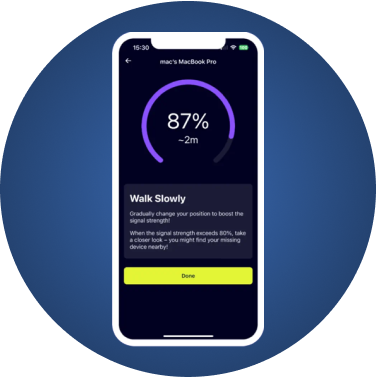
- **Signalstärke prüfen** — wenn das Gerät angezeigt wird, ist es noch in der Nähe
- **Schritte zurückverfolgen** — gehen Sie zum letzten Ort zurück, an dem Sie es hatten
An der Sicherheitskontrolle
- Bitten Sie das Sicherheitspersonal, die Wannen zu überprüfen
- Scannen Sie mit FindMyGear in der Nähe der Kontrolle
- Liegengelassene Gegenstände werden normalerweise vom Personal eingesammelt
Am Gate
- Scannen Sie den Wartebereich, in dem Sie gesessen haben
- Schauen Sie unter die Sitze und zwischen die Armlehnen
- Fragen Sie das Gate-Personal — Passagiere geben gefundene Gegenstände oft ab
Geräte im Hotel finden
Schneller Zimmerscan
- Öffnen Sie FindMyGear und starten Sie den Scan
- Gehen Sie systematisch durch das Zimmer
- Schauen Sie unter Kissen, zwischen Laken und hinter Nachttische
- Vergessen Sie nicht die Ablage im Bad und die Duschablage
Nach dem Auschecken
- Rufen Sie sofort an der Rezeption an
- Nennen Sie Ihre Zimmernummer und die Gerätebeschreibung
- Hotels bewahren Fundstücke in der Regel 30–90 Tage auf
Profi-Reisetipps
- **Vor dem Verlassen scannen** — machen Sie es zur Gewohnheit
- **Festen Aufbewahrungsort nutzen** — Geräte immer in die gleiche Tasche legen
- **FindMyGear-Benachrichtigungen aktivieren** — erhalten Sie Alarme, wenn Sie sich von Ihren Geräten entfernen
- **Reiseinventar erstellen** — wissen Sie genau, welche Bluetooth-Geräte Sie dabeihaben
- **Geräte vor der Reise aufladen** — leere Akkus bedeuten kein Bluetooth-Signal
Das Flugmodus-Problem
Viele Reisende sorgen sich, dass der Flugmodus Bluetooth deaktiviert. Die gute Nachricht:
- Moderne Fluggesellschaften erlauben Bluetooth während des Fluges
- Sie können Bluetooth auch im Flugmodus separat aktivieren
- AirPods und Kopfhörer senden auch im Energiesparmodus weiter
Fazit
Der Verlust eines Bluetooth-Geräts auf Reisen muss Ihren Urlaub nicht ruinieren. Mit FindMyGear können Sie schnell jeden Bereich scannen und Ihre Geräte anhand der Signalstärke orten. Machen Sie das Scannen an jeder Station zur Gewohnheit, und Sie werden Ihre Ausrüstung nie wieder vergessen.